> ## Documentation Index
> Fetch the complete documentation index at: https://vendo-mintlify-9465070f.mintlify.site/llms.txt
> Use this file to discover all available pages before exploring further.

# Generated apps

> How one ask becomes one app.tsx screen, what that screen may write, what happens when an ask is bigger than a screen, and why every user ends up with their own copy.

Your user asks for something. One `app.tsx` screen comes back, live on real data.

## One ask, one app

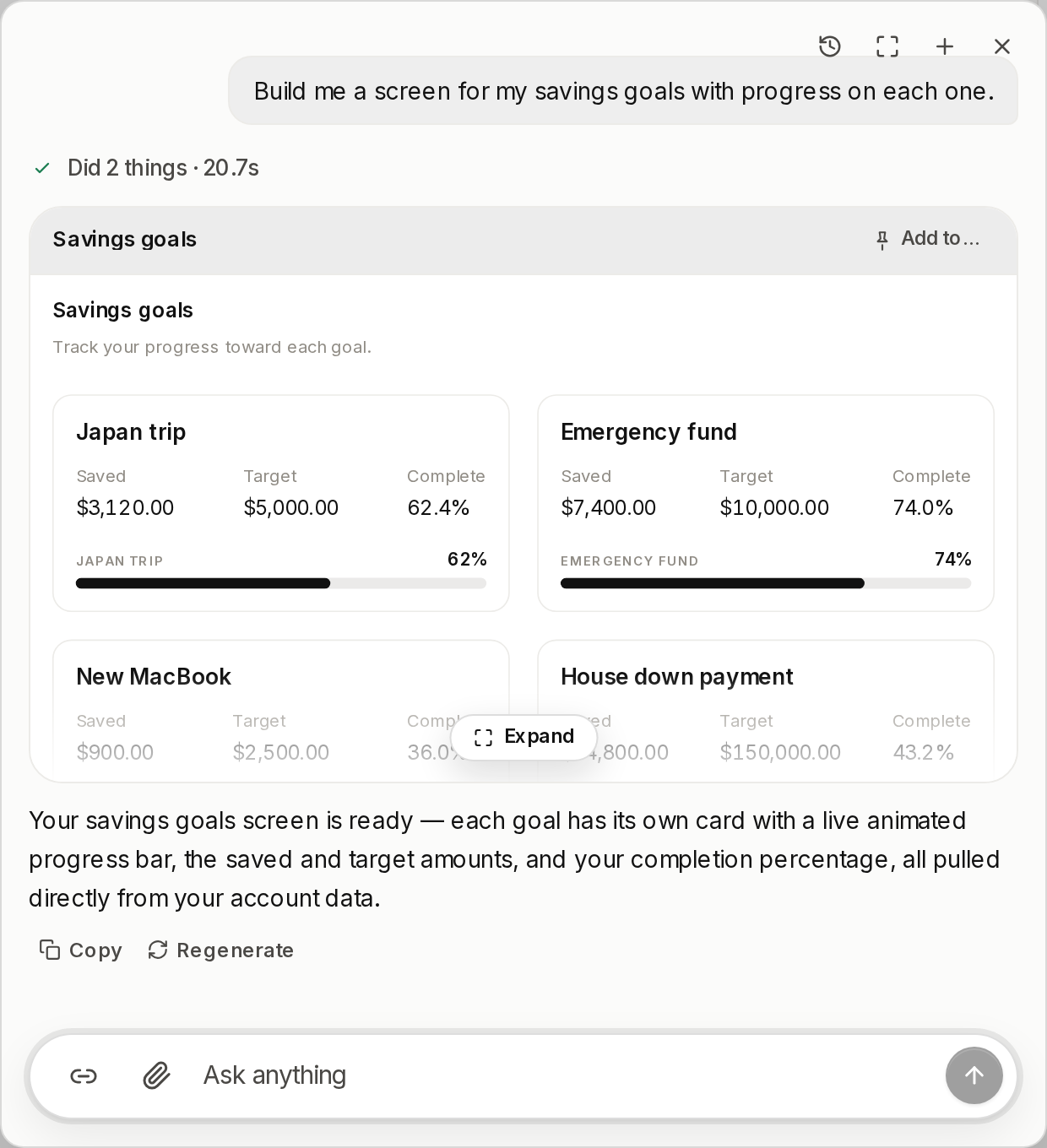
The plan's skeleton paints in seconds. The finished screen replaces it in place.

<Frame caption="The screen re-runs on every open, so it opens on today's numbers. There is no snapshot to go stale.">
  <img src="https://mintcdn.com/vendo-mintlify-9465070f/oYTEzUuScYkXt6Yp/images/maple/app-savings-goals.png?fit=max&auto=format&n=oYTEzUuScYkXt6Yp&q=85&s=c4b392f51fc442a1d84d3f2d78c0ec5d" alt="A savings goals screen built in the Maple panel, one card per goal with the amount saved, the target, and a progress bar" width="620" height="680" data-path="images/maple/app-savings-goals.png" />
</Frame>

An app is one file, holding one default-exported React component. Saving it repaints the person's screen.

```tsx app.tsx focus={4,15} theme={null}
import { useQuery, tools, Stack, Row, Text, Money, Button } from "@vendo/screen";

export default function Spend() {
  const spend = useQuery("host_spend_by_category", { month: "aug" });

  return (
    <Stack gap={12}>
      <Text text="Spend by category" variant="heading" />
      {spend.rows.map((row) => (
        <Row key={row.category} justify="between">
          <Text text={row.category} />
          <Money amount={row.amount_cents / 100} />
        </Row>
      ))}
      <Button label="Set budget" onClick={() => tools.host_budget_set({ budget: 1800 })} />
    </Stack>
  );
}
```

`useQuery` is synchronous and hands back the tool's own result, so field names come off the tool's schema. `tools.<name>(args)` is the only way a screen changes anything.

## When an ask is bigger than a screen

Most asks are one screen. When one is not, the tool says so and stops: it raises a standing approval card and returns, having spent nothing. The card waits for the person, however long that takes.

On yes, a disposable sandbox builds the app once — npm from the registry, a coding agent inside the box, tested against reality — and then the box is released and dies. What comes home is **sealed**: an immutable, content-addressed bundle stored as blobs, alongside its source and lockfile. Every seal is a version.

<Note>
  **The gate.** A build is gated on one thing, a configured `sandbox` adapter. Without one the ask is refused rather than offered.
</Note>

A sealed bundle renders in a sandboxed iframe: `sandbox="allow-scripts"` without `allow-same-origin`, so the frame has an opaque origin, and a `Content-Security-Policy: default-src 'none'` header, so it makes no network request at all. Your brand tokens and fonts are injected at render, never baked into the seal, so one seal follows your palette rather than pinning the one it was built under.

Host data reaches the frame through one `postMessage` bridge into the guarded tool door, with the viewer's own permissions.

An edit reseals from the stored source in a fresh box.

## What a screen may write

A small closed surface, enforced at save rather than advised in a style guide.

<Columns cols={2}>
  <Card title="Allowed" icon="check">
    * `react` and `@vendo/screen`, and nothing else
    * `useQuery("tool_name", { literal })`, read tools only
    * `tools.tool_name(args)`, from a handler
    * `<Stack>` `<Row>` `<Grid>` `<Text>` `<Stat>` `<Button>`
    * the components you registered
    * `<div>` `<p>` `<h2>`, children and an inline `style`
    * React state through `useState`
  </Card>

  <Card title="Refused" icon="x">
    * any third import, `import(…)`, `require(…)`
    * a query input from a prop, state, or another query
    * a write tool inside `useQuery`
    * a tool call in the render body
    * `document` `fetch` `setTimeout` `process`
    * `<img>` `<script>`, or `className` on a display tag
    * a component you never registered
  </Card>
</Columns>

Every save is compiled, scanned, type checked, run once, and its tree validated. The first stage that finds something is the last one that runs, and the last good screen keeps serving.

A refusal names the line and says what to write instead. Nothing paints, and no app row lands.

## Own it

Nobody uses someone else's app. They get their own copy of it.

<Frame caption="Import and fork each mint a fresh app_ id.">
  <svg viewBox="0 0 700 62" width="100%" role="img" aria-label="Ana's app_790892b0 imported into your app_c0d6b562, then forked into your app_3f11ad7c.">
    <rect x="1" y="16" width="176" height="30" rx="8" fill="currentColor" fillOpacity="0.04" stroke="currentColor" strokeOpacity="0.22" />

    <text x="89" y="30" fontSize="8" textAnchor="middle" fill="currentColor" fillOpacity="0.55">Ana's</text>
    <text x="89" y="41" fontSize="11" fontWeight="600" textAnchor="middle" fill="currentColor">app\_790892b0…</text>

    <line x1="185" y1="31" x2="252" y2="31" stroke="#6c3bff" strokeOpacity="0.4" strokeWidth="1.5" />

    <path d="M262 31 l-10 -5 v10 z" fill="#6c3bff" fillOpacity="0.6" />

    <text x="218" y="17" fontSize="10" textAnchor="middle" fill="#6c3bff">import</text>

    <rect x="262" y="16" width="176" height="30" rx="8" fill="#6c3bff" fillOpacity="0.08" stroke="#6c3bff" strokeOpacity="0.35" />

    <text x="350" y="30" fontSize="8" textAnchor="middle" fill="#6c3bff" fillOpacity="0.75">yours</text>
    <text x="350" y="41" fontSize="11" fontWeight="600" textAnchor="middle" fill="#6c3bff">app\_c0d6b562…</text>

    <line x1="446" y1="31" x2="513" y2="31" stroke="#6c3bff" strokeOpacity="0.4" strokeWidth="1.5" />

    <path d="M523 31 l-10 -5 v10 z" fill="#6c3bff" fillOpacity="0.6" />

    <text x="479" y="17" fontSize="10" textAnchor="middle" fill="#6c3bff">fork</text>

    <rect x="523" y="16" width="176" height="30" rx="8" fill="#6c3bff" fillOpacity="0.08" stroke="#6c3bff" strokeOpacity="0.35" />

    <text x="611" y="30" fontSize="8" textAnchor="middle" fill="#6c3bff" fillOpacity="0.75">yours</text>
    <text x="611" y="41" fontSize="11" fontWeight="600" textAnchor="middle" fill="#6c3bff">app\_3f11ad7c…</text>
  </svg>
</Frame>

Ana shares a link, and the link carries the app and nothing else. Importing it mints a fresh id in your account, reading your rows under your approvals.

Fork it and you mint another id.

A built app is the exception. Sharing, forking, exporting, and placing one are all refused server-side.

## Where to go next

<Columns cols={2}>
  <Card title="Host components" href="/generated/host-components">
    Register your own components and a screen renders your real UI.

    `Kit + the ones you registered`
  </Card>

  <Card title="Import & fork" href="/generated/import-and-fork">
    How a copy is minted, and what it deliberately leaves behind.

    `import → app_c0d6b562…`
  </Card>
</Columns>